二、SSM整合配置
1、config配置
1、WebMvcJavaConfig配置类
1、我们在控制层所需要配置的类有
- 1、controller
- 2、handlerAdapter、handlerMapping
- 3、全局异常处理器
- 4、静态资源处理器
- 5、拦截器
- 6、jsp视图解析器的前后缀
- 7、json转换器
2、要用到的注解
- @RestController = @Controller + @ResponseBody
- @EnableWebMvc = 2+7
- @Configuration //配置类
- @ComponentScan({"com.atguigu.controller" ,"com.atguigu.exceptionHandler"}) //自动扫描
3、补充
1、我们在写这个配置类的时候,需要实现一个接口
2、这个接口有很多相关配置类的借口方法
3、实现这个接口:WebMvcConfigurer
4、例子
package com.atguigu.config;

import org.springframework.context.annotation.ComponentScan;
import org.springframework.context.annotation.Configuration;
import org.springframework.web.bind.annotation.RestController;
import org.springframework.web.servlet.config.annotation.*;

/**
 * 控制层的配置类
 *      1、controller
 *      2、handlerMapping handlerAdapter
 *      3、全局异常处理器
 *      4、静态资源处理
 *      5、拦截器
 *      6、jsp视图解析器前后缀
 *      7、json转化器
 * @author shkstart
 */
@RestController
@EnableWebMvc //这个包括2、7
@Configuration
@ComponentScan({"com.atguigu.controller" ,"com.atguigu.exceptionHandler"})
public class WebMvcJavaConfig  implements WebMvcConfigurer {

//    静态资源处理
    @Override
    public void configureDefaultServletHandling(DefaultServletHandlerConfigurer configurer) {
        configurer.enable();
    }

//    jsp视图解析器前后缀
    @Override
    public void configureViewResolvers(ViewResolverRegistry registry) {
        registry.jsp("/WEB-INF/views/", ".jsp");
    }

//    拦截器
    @Override
    public void addInterceptors(InterceptorRegistry registry) {
//        registry.addInterceptor().addPathPatterns().excludePathPatterns()
    }
}
2、ServiceJavaConfig配置类
1、我们在service层所需配置类
1、开启aop注解的支持:aspect:
- @Before
- @After
- @AfterReturning
- @AfterThrowing
- @Around
- @Aspect
- @Order
2、开启事务的支持
- @Transactional ;对应的事务管理器实现
2、所用到的注解
1、@EnableAspectJAutoProxy //开启aop注解的支持
- 这个注解就可以开启以上的aop注解
2、@EnableTransactionManagement
- 这个开启事务的支持
3、@Configuration
- 设置为配置类
4、@ComponentScan("com.atguigu.service")
- 设置扫描的包
3、例子
package com.atguigu.config;

import org.springframework.context.annotation.Bean;
import org.springframework.context.annotation.ComponentScan;
import org.springframework.context.annotation.Configuration;
import org.springframework.context.annotation.EnableAspectJAutoProxy;
import org.springframework.jdbc.datasource.DataSourceTransactionManager;
import org.springframework.transaction.TransactionManager;
import org.springframework.transaction.annotation.EnableTransactionManagement;

import javax.sql.DataSource;

/**
 * service
 *  1、开启aop注解的支持:aspect:@Before @After @AfterReturning @AfterThrowing @Around @Aspect @Order
 *  2、开启事务的支持:@Transactional ;对应的事务管理器实现
 *
 */
@Configuration
@EnableAspectJAutoProxy //开启aop注解的支持
@EnableTransactionManagement
@ComponentScan("com.atguigu.service")
public class ServiceJavaConfig {

    @Bean
    public TransactionManager transactionManager(DataSource dataSource){
        DataSourceTransactionManager dataSourceTransactionManager = new DataSourceTransactionManager();
        dataSourceTransactionManager.setDataSource(dataSource);
        return  dataSourceTransactionManager;
    }
}
3、MapperJavaConfig配置类(方法一:用配置类+xml)
1、我们在持久层所需要配置的类有
1、数据库连接池
2、把sqlSessionFactory加入ioc容器
3、把Mapper代理类加入ioc容器
2、用到的注解
1、@Configuration
- 设置配置类
2、@Bean
- 这个是把写的配置方法加入ioc容器
3、补充
1、这里我们使用方法一:配置类+xml外部文件
2、先写好mybatis-config.xml文件
3、然后在sqlSessionFactory进行引用,配置数据库的配置信息,指定数据库连接对象
4、然后就可以了
4、例子
1、resources/mybatis-config.xml
<?xml version="1.0" encoding="UTF-8" ?>
<!DOCTYPE configuration
        PUBLIC "-//mybatis.org//DTD Config 3.0//EN"
        "http://mybatis.org/dtd/mybatis-3-config.dtd">
<configuration>

<!--    这里不写数据库连接信息,我们用DruidDataSource  还有mapper的包的指定-->

    <settings>
        <!-- 开启驼峰式映射-->
        <setting name="mapUnderscoreToCamelCase" value="true"/>
        <!-- 开启logback日志输出-->
        <setting name="logImpl" value="SLF4J"/>
        <!--开启resultMap自动映射 -->
        <setting name="autoMappingBehavior" value="FULL"/>
    </settings>

    <typeAliases>
        <!-- 给实体类起别名 -->
        <package name="com.atguigu.pojo"/>
    </typeAliases>

    <plugins>
        <plugin interceptor="com.github.pagehelper.PageInterceptor">
            <!--
                helperDialect:分页插件会自动检测当前的数据库链接,自动选择合适的分页方式。
                你可以配置helperDialect属性来指定分页插件使用哪种方言。配置时,可以使用下面的缩写值:
                oracle,mysql,mariadb,sqlite,hsqldb,postgresql,db2,sqlserver,informix,h2,sqlserver2012,derby
                (完整内容看 PageAutoDialect) 特别注意:使用 SqlServer2012 数据库时,
                https://github.com/pagehelper/Mybatis-PageHelper/blob/master/wikis/zh/HowToUse.md#%E5%A6%82%E4%BD%95%E9%85%8D%E7%BD%AE%E6%95%B0%E6%8D%AE%E5%BA%93%E6%96%B9%E8%A8%80
             -->
            <property name="helperDialect" value="mysql"/>
        </plugin>
    </plugins>
</configuration>
2、MapperJavaConfig配置类
package com.atguigu.config;

import org.mybatis.spring.SqlSessionFactoryBean;
import org.mybatis.spring.mapper.MapperScannerConfigurer;
import org.springframework.beans.factory.annotation.Value;
import org.springframework.context.annotation.Bean;
import org.springframework.context.annotation.Configuration;
import org.springframework.context.annotation.PropertySource;
import org.springframework.core.io.ClassPathResource;
import org.springframework.core.io.Resource;

import javax.sql.DataSource;

/**
 * 持久层配置类:连接池、sqlSessionFactory、Mapper代理对象
 *
 *  方式一:保留配置文件
 *      TODO:问题:BUG dataSource和mybatis配置在一起会出现问题
 *              原因:mybatis的组件优先加载,@Value没有读取到
 *              解决:分开配置,写到不同的类就行。
 */
@Configuration //配置类
public class MapperJavaConfig {

    //    sqlSessionFactory加入ioc容器
    @Bean
    public SqlSessionFactoryBean sqlSessionFactory(DataSource dataSource){
        SqlSessionFactoryBean sqlSessionFactoryBean = new SqlSessionFactoryBean();
//        指定配置文件等信息
//        指定数据库连接池对象
        sqlSessionFactoryBean.setDataSource(dataSource);
//        指定外部的mybatis文件
//        Resource是spring.core的包
        Resource resource = new ClassPathResource("mybatis-config.xml");
        sqlSessionFactoryBean.setConfigLocation(resource);
        return  sqlSessionFactoryBean;
    }

//    Mapper代理对象加入ioc容器
    @Bean
    public MapperScannerConfigurer mapperScannerConfigurer(){
        MapperScannerConfigurer mapperScannerConfigurer = new MapperScannerConfigurer();
//        指定Mapper接口的包
        mapperScannerConfigurer.setBasePackage("com.atguigu.mapper");
        return  mapperScannerConfigurer;
    }

}
4、MapperJavaConfig配置类(方法二:完全使用配置类)
1、我们在持久层所需要配置的类有
1、数据库连接池
2、把sqlSessionFactory加入ioc容器
3、把Mapper代理类加入ioc容器
2、用到的注解
1、@Configuration
- 设置配置类
2、@Bean
- 这个是把写的配置方法加入ioc容器
3、补充
1、这里我们使用方法二:完全配置类
2、完全在sqlSessionFactory进行引用,配置数据库的配置信息,指定数据库连接对象,等信息。(例如:驼峰映射、日志输出、别名、其他插件啥的)
4、然后就可以了
4、例子
1、MapperJavaConfigNew.java配置类
package com.atguigu.config;

import com.github.pagehelper.PageInterceptor;
import org.apache.ibatis.logging.slf4j.Slf4jImpl;
import org.apache.ibatis.session.AutoMappingBehavior;
import org.mybatis.spring.SqlSessionFactoryBean;
import org.mybatis.spring.mapper.MapperScannerConfigurer;
import org.springframework.context.annotation.Bean;
import org.springframework.context.annotation.Configuration;
import org.springframework.core.io.ClassPathResource;
import org.springframework.core.io.Resource;

import javax.sql.DataSource;
import java.util.Properties;

/**
 * 持久层配置类:连接池、sqlSessionFactory、Mapper代理对象
 *
 *  方式2:不保留配置文件
 *      TODO:问题:BUG dataSource和mybatis配置在一起会出现问题
 *              原因:mybatis的组件优先加载,@Value没有读取到
 *              解决:分开配置,写到不同的类就行。
 */
@Configuration //配置类
public class MapperJavaConfigNew {

    //    sqlSessionFactory加入ioc容器
    @Bean
    public SqlSessionFactoryBean sqlSessionFactory(DataSource dataSource){
        SqlSessionFactoryBean sqlSessionFactoryBean = new SqlSessionFactoryBean();
//        指定配置文件等信息
//        指定数据库连接池对象
        sqlSessionFactoryBean.setDataSource(dataSource);
////        指定外部的mybatis文件
////        Resource是spring.core的包
//        Resource resource = new ClassPathResource("mybatis-config.xml");
//        sqlSessionFactoryBean.setConfigLocation(resource);

//        方式2:使用java的代码配置类
        org.apache.ibatis.session.Configuration configuration = new org.apache.ibatis.session.Configuration();
//        ①设置驼峰映射
        configuration.setMapUnderscoreToCamelCase(true);
//        ②设置日志输出
        configuration.setLogImpl(Slf4jImpl.class);
//        ③开启resultType自动映射
        configuration.setAutoMappingBehavior(AutoMappingBehavior.FULL);
//        把①、②、③存入到sqlSessionFactoryBean中
        sqlSessionFactoryBean.setConfiguration(configuration);

//        ④别名设置
        sqlSessionFactoryBean.setTypeAliasesPackage("com.atguigu.pojo");

//        ⑤加入插件,分页插件
        PageInterceptor pageInterceptor = new PageInterceptor();
        Properties properties = new Properties();
//        设置数据库类型
        properties.setProperty("helperDialect","mysql");
//        给pageInterceptor设置数据库类型
        pageInterceptor.setProperties(properties);
//        把添加的⑤插件加入到存入到sqlSessionFactoryBean中
        sqlSessionFactoryBean.addPlugins(pageInterceptor);

        return  sqlSessionFactoryBean;
    }

//    Mapper代理对象加入ioc容器
    @Bean
    public MapperScannerConfigurer mapperScannerConfigurer(){
        MapperScannerConfigurer mapperScannerConfigurer = new MapperScannerConfigurer();

//        指定Mapper接口的包
        mapperScannerConfigurer.setBasePackage("com.atguigu.mapper");
        return  mapperScannerConfigurer;
    }
}
5、❗❗DataSourceJavaConfig配置类
1、注意
1、这里为什么不和MapperJavaConfig一起配置呢
2、dataSource和mybatis配置在一起会出现问题
3、原因:mybatis的组件优先加载,@Value没有读取到
4、解决:分开配置,写到不同的类就行。
2、所需要配置的类
1、连接池的配置
3、用到的注解
1、@Configuration
- 配置类
2、@PropertySource("classpath:jdbc.properties")
- 这个是引入外部的文件注解
- 主要是引入jdbc.properties中数据库中的:
- user
- password
- url
- driver
4、例子
1、DataSourceJavaConfig.java
package com.atguigu.config;

import com.alibaba.druid.pool.DruidDataSource;
import org.mybatis.spring.SqlSessionFactoryBean;
import org.springframework.beans.factory.annotation.Value;
import org.springframework.context.annotation.Bean;
import org.springframework.context.annotation.Configuration;
import org.springframework.context.annotation.PropertySource;
import org.springframework.core.io.ClassPathResource;
import org.springframework.core.io.Resource;

import javax.sql.DataSource;

/**
 * 连接池的配置类
 */
@Configuration //配置类
@PropertySource("classpath:jdbc.properties") //引入外部文件
public class DataSourceJavaConfig {

    @Value("${jdbc.user}")
    private String user;
    @Value("${jdbc.password}")
    private String password;
    @Value("${jdbc.driver}")
    private String driver;
    @Value("${jdbc.url}")
    private String url;

    @Bean
    public DataSource dataSource(){
        DruidDataSource dataSource = new DruidDataSource();
        dataSource.setPassword(password);
        dataSource.setUsername(user);
        dataSource.setDriverClassName(driver);
        dataSource.setUrl(url);
        return dataSource;
    }
}
6、SpringIoCInit初始化配置类
1、这个配置是用来初始化Spring
2、要继承并实现AbstractAnnotationConfigDispatcherServletInitializer接口
3、代码
package com.atguigu.config;

import org.springframework.web.servlet.support.AbstractAnnotationConfigDispatcherServletInitializer;

/**
 * spring的初始化类
 */
public class SpringIoCInit extends AbstractAnnotationConfigDispatcherServletInitializer {

//    root容器配置类
    @Override
    protected Class<?>[] getRootConfigClasses() {
        return new Class[]{DataSourceJavaConfig.class, MapperJavaConfigNew.class, ServiceJavaConfig.class};
    }
//   webioc容器配置类指定
    @Override
    protected Class<?>[] getServletConfigClasses() {
        return new Class[]{WebMvcJavaConfig.class};
    }

//    dispatcherServlet的拦截路径
    @Override
    protected String[] getServletMappings() {
        return new String[]{"/"};
    }
}
7、其他配置类信息
1、配置jdbc.properties
1、要设置在resources/jdbc.properties中
2、例子
jdbc.user=root
jdbc.password=root
jdbc.url=jdbc:mysql:///mybatis-example
jdbc.driver=com.mysql.cj.jdbc.Driver
2、配置logback.xml
1、这个是一个日志
2、所需要用到的注解:@Slf4j
3、就是一个日志输出。写好配置类,在所需要配置日志的地方,加上注解就行
4、代码
<?xml version="1.0" encoding="UTF-8"?>
<configuration debug="true">
    <!-- 指定日志输出的位置,ConsoleAppender表示输出到控制台 -->
    <appender name="STDOUT"
              class="ch.qos.logback.core.ConsoleAppender">
        <encoder>
            <!-- 日志输出的格式 -->
            <!-- 按照顺序分别是:时间、日志级别、线程名称、打印日志的类、日志主体内容、换行 -->
            <pattern>[%d{HH:mm:ss.SSS}] [%-5level] [%thread] [%logger] [%msg]%n</pattern>
            <charset>UTF-8</charset>
        </encoder>
    </appender>

    <!-- 设置全局日志级别。日志级别按顺序分别是:TRACE、DEBUG、INFO、WARN、ERROR -->
    <!-- 指定任何一个日志级别都只打印当前级别和后面级别的日志。 -->
    <root level="DEBUG">
        <!-- 指定打印日志的appender,这里通过“STDOUT”引用了前面配置的appender -->
        <appender-ref ref="STDOUT" />
    </root>

    <!-- 根据特殊需求指定局部日志级别,可也是包名或全类名。 -->
    <logger name="com.atguigu.mybatis" level="DEBUG" />

</configuration>
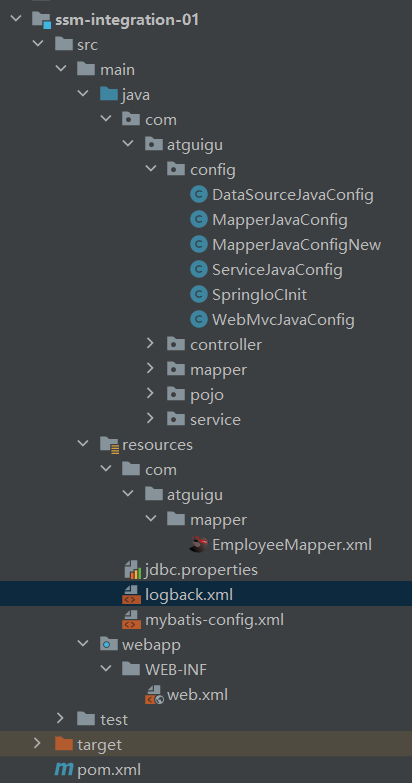
2、项目结构
1、如图
3、遇到的问题BUG
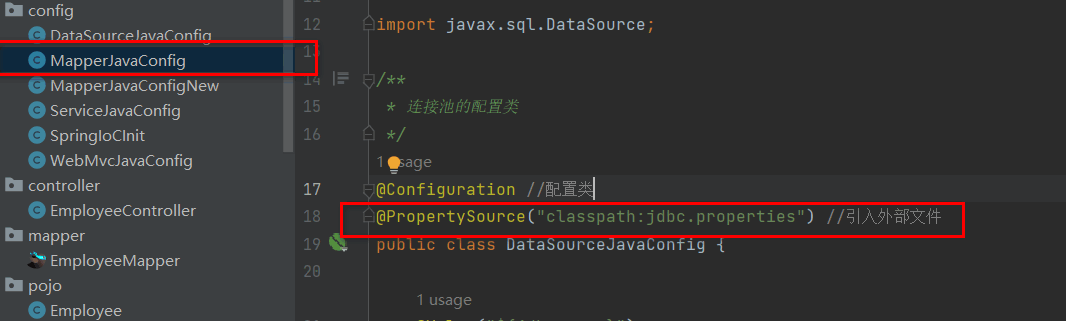
1、Caused by: java.io.FileNotFoundException: Could not open ServletContext resource [/jdbc.properties]
1、解决
1、在@PropertySource("classpath:jdbc.properties") 中间+classpath:
2、
2、如图
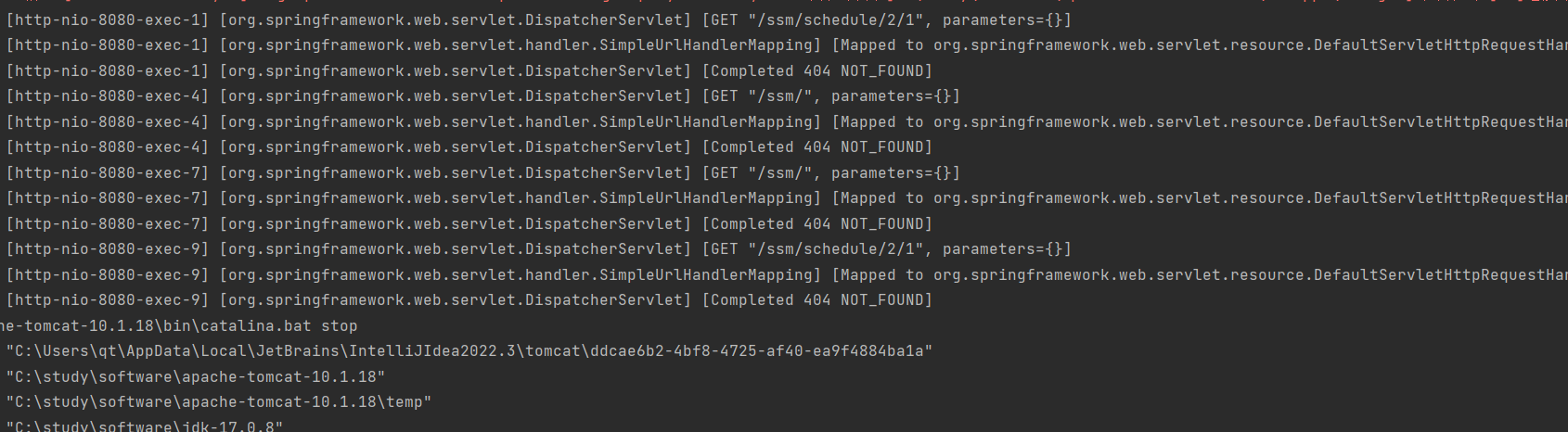
1、解决
1、眼睛瞎了,没有写@RestController
3、如图500错误
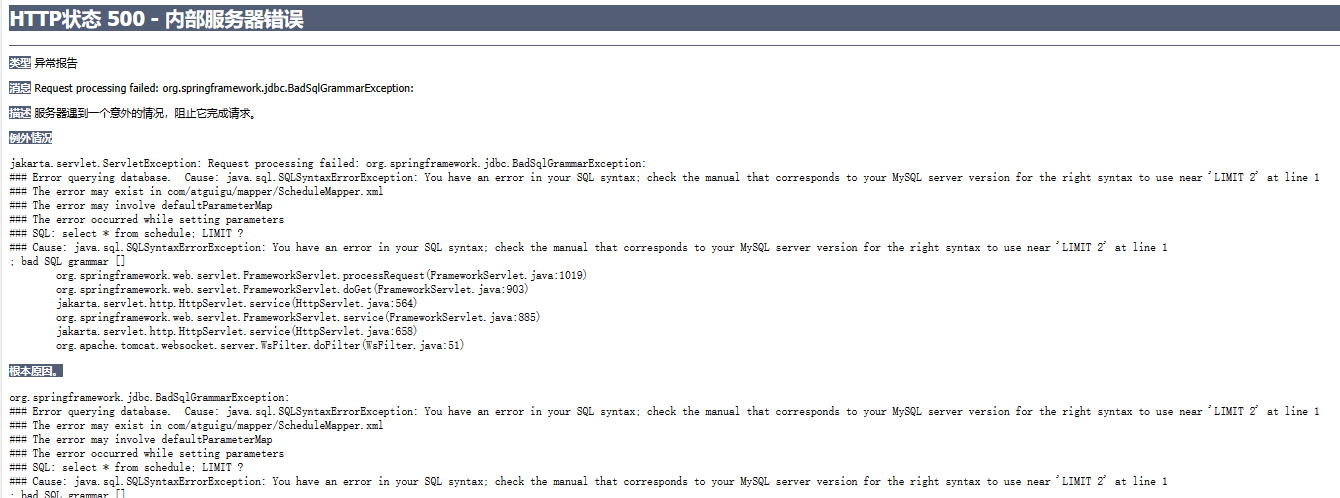
1、解决
1、如果在有分页的情况下。不要去写;号
2、把分好去掉就行