第十九章、IO流
1、文件
1.1、文件就是保存数据的地方
1.2、文件流(以程序为中心)
1、文件在程序中是以流的形式来操作的
2、输入流:文件到程序的内存的路径
3、输出流:程序的内存到文件的路径
2、常用的文件操作
2.1、创建文件对象相关构造器和方法
1、new File(String pathname) //根据路径创建一个File对象
2、new File(File parent,String child) //根据父类目录文件+子路径构建
3、new File(String parent,String child) //根据父目录+子路径构建
4、createNewFile:创建新文件
5、eg
//    方式一
    @Test
    public void createo1() throws IOException {
        String filePath = "E:\\test001\\newt.txt";
        File file = new File(filePath);
        file.createNewFile();
        System.out.println("文件创建成功");
    }
//    方式二
//    new  File(File parent,String child)    //根据父类目录文件+子路径构建
//    E:\test001\newt.txt
//    父亲:E:\test001\
//    子路径newt.txt文件名
    @Test
    public void create02(){
        File parentFile = new File("E:\\test001\\");
        String fileName = "newt.txt";
        File file = new File(parentFile,fileName);
        try {
            file.createNewFile();
            System.out.println("创建成功");
        } catch (IOException e) {
            throw new RuntimeException(e);
        }
    }
//    方式三
    public void create03(){
        String  parentPath = "E:\\";
        String file  ="newt3.txt";
        File file1 = new File(parentPath);
        try {
            file1.createNewFile();
        } catch (IOException e) {
            e.printStackTrace();
        }
    }
2.2、获取文件相关信息常用方法
1、getName():得到文件名字
2、getAbsoultePath():文件绝对路径
3、getParent():父级目录
4、length():文件大小,按照字节
5、exists():文件是否存在
6、isFile():是不是一个文件
7、isDirectory():是不是一个目录
8、eg:
    public void info(){
//        先创建文件对象
        File file = new File("C:\\Users\\Administrator\\Desktop\\时间表.txt");
//        调用相应的方法,得到对应信息
        System.out.println("文件名字="+file.getName());
//        获取文件绝对路径
        System.out.println("文件绝对路径="+file.getAbsolutePath());
//        文件父级目录
        System.out.println("文件父级目录="+file.getParent());
//        文件大小
        System.out.println("文件大小(按字节)"+file.length());
//        判断文件是否存在
        System.out.println("文件是否存在="+file.exists());
//        文件是否一个文件
        System.out.println("是不是一个文件="+file.isFile());
        System.out.println("文件是不是一个目录="+file.isDirectory());
    }
2.3、目录的操作和文件删除
1、mkdir创建一级目录、mkdirs创建多级目录、delete删除空目录或文件
3、IO原理及流的分类
3.1、JAVA IO流原理(以内存为主视角)
1、I:input。O:output。用于处理数据传输。
2、Java中,对数据的输入和输出是以流的形式进行
3、通过调用流的各种接口和类,来获取不同的数据
3.2、流的分类
1、按操作数据单位不同分,按字节流(8bit),字符流(按字符,对应几个字节,需要根据编码情况来看.)
(1)字节流:可以无损操作音视频,效率低
(2)字符流:操作文本文件较多。效率高
2、按数据流的流向不同分为:输入流、输出流
3、抽象类
(1)四个类派生出来的
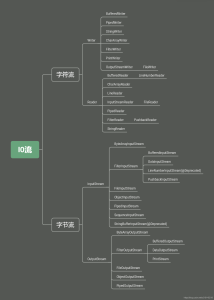
4、IO流体系图-常用的类
1、体系图
2、文件和流不同
4.1、InputStream:字节输入流
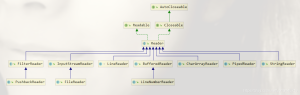
1、关系图
2、FileInputStream
字节输入流,文件中的数据输入到内存中
1、读取数据输入到内存中
2、eg
@Test
//单个字节的读取read()
    public void readFile01() throws IOException {
        String filePath1 = "E:\\hello.txt";
        int readData = 0;
        FileInputStream fileInputStream=null;
        try {

//            创建FileInputStream 对象
             fileInputStream = new FileInputStream(filePath1);
//            从该输入流读取一个字节的数据。如果没有输入可用,此方法将阻止。
//            如何返回-1,表示读取完毕
            while((readData=fileInputStream.read())!=-1){
                System.out.print((char)readData);//转成char显示
            }
        } catch (IOException e) {
            e.printStackTrace();
        }finally {
//            关闭文件流
//            释放资源
            fileInputStream.close();
        }
    }
    @Test
//    优化,使用read(byte[] b)读取文件
        public void readFile2() throws IOException {
            String filePath1 = "E:\\hello.txt";
//            字节数组,
            byte[] buf = new byte[8];//一次读取8个字节
            int readLen=0;
            FileInputStream fileInputStream=null;
            try {
        //            创建FileInputStream 对象
                fileInputStream = new FileInputStream(filePath1);
        //            从该输入流读取最多b.length字节的数据到字符数组。此方法将阻止。
        //            如何返回-1,表示读取完毕
//                    如果读取正常,返回实际读取的字节数
                while((readLen=fileInputStream.read(buf))!=-1){
                    System.out.print(new String(buf,0,readLen));//转成char显示
                }
            } catch (IOException e) {
                e.printStackTrace();
            }finally {
        //            关闭文件流
        //            释放资源
                fileInputStream.close();
            }
        }
3、 OutputStream
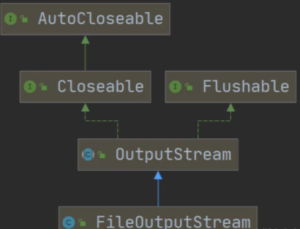
1、结构图
2、write()方法:写入输出流到文件
3、eg:
    public void writeFie() throws IOException {
//        创建FileOutputStream对象
        FileOutputStream fileOutputStream =null;
        String filePath="E:\\input.txt";
        try {
//            得到一个fileOutputStream对象
//            new FileOutputStream(filePath)。创建方式,当写入内容是,覆盖原先内容。
//            new FileOutputStream(filePath)。创建方式,当写入内容是,是追加到文件后面
            fileOutputStream = new FileOutputStream(filePath);
//            写入一个内容字节
            fileOutputStream.write('b');
//            写入内容字符
            String str = "   choushabi";
            fileOutputStream.write(str.getBytes());//把一个字符串转成字符数组
//            写入限定长度字符
            fileOutputStream.write(str.getBytes(),0,3);
        } catch (IOException e) {
            e.printStackTrace();
        }finally {
            fileOutputStream.close();
        }
    }
4.2、FileReader和FileWriter
FileReader和FileWriter是字符流,是按照字符来操作IO
1、FileReader相关方法
1、new FileReader(File/String)
2、read:每次读取单个字符,返回该字符,如果文件末尾返回-1
3、read(char[]):批量读取多个字符到数组,返回读取的字符数,如果到文件末尾返回-1
4、相关API:
(1)new String(char[]):将char[] 转换成String
(2)new String(char[],off,len):将char[]的指定部分转换成String
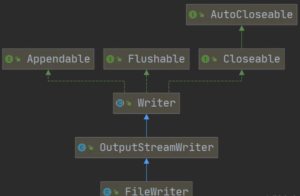
2、FileWriter相关方法
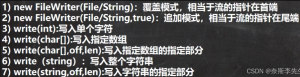
3、FileWrite类结构图
4、eg
    //单字符读取
    @Test
    public void readFIle01(){
        String filePath = "E:\\test\\sss.txt";
        FileReader fileReader = null;
        int data =0;
//        创建对象
        try {
            fileReader = new FileReader(filePath);
            while((data =fileReader.read())!=-1){
                System.out.println((char) data);
            }
        } catch (IOException e) {
            e.printStackTrace();
        }finally {
            if(fileReader!=null){
                try {
                    fileReader.close();
                } catch (IOException e) {
                    e.printStackTrace();
                }
            }
        }
    }
    //多字符读取
    @Test
    public void readFIle02(){
        String filePath = "E:\\test\\sss.txt";
        FileReader fileReader = null;
        int readLen =0;
        char[] buf = new char[10];
//        创建对象
        try {
            fileReader = new FileReader(filePath);
//            循环读取,使用read(buf),返回的是实际读取到的字符数
//            如果返回-1,说明到文件结束
            while((readLen =fileReader.read(buf))!=-1){
                System.out.println(new String(buf,0,readLen));
            }
        } catch (IOException e) {
            e.printStackTrace();
        }finally {
            if(fileReader!=null){
                try {
                    fileReader.close();
                } catch (IOException e) {
                    e.printStackTrace();
                }
            }
        }
    }

//eg2
        String filePath = "E:\\test\\sss.txt";
//      创建类型
        FileWriter fileWriter = null;
        char[] chars = {'Y','S','B'};
        try {
            fileWriter = new FileWriter(filePath);
            fileWriter.write('H');
            fileWriter.write(chars);
            fileWriter.write("臭宝".toCharArray(),0,1);
            fileWriter.write("你好憨包");
        } catch (IOException e) {
            e.printStackTrace();
        }finally {
            try {
//                写内容一定要关流
                fileWriter.close();
            } catch (IOException e) {
                e.printStackTrace();
            }
        }
5、节点流和处理流
5.1、基本介绍
1、节点流可以从一个特定的数据源读写数据,如FileReader、FileWriter
2、处理流(也叫包装流)是“连接”在已存在的流(节点流或处理流)之上,为程序提供更为强大的读写功能,如BufferedReader、BufferedWriter
(1)理解:在BufferWriter里套一个其他的IO类,提供向上转型可以调用
5.2、节点流和处理流的区别和联系
1、节点流是低层流直接跟数据相连接
2、处理流包装节点流,既可以消除不同节点流的实现诧异,也可以提供更方便的方法来完成输入输出。
3、处理流(也叫包装流)对节点流进行包装,使用了修饰器设计模式,不会直接与数据相连【模拟修饰器设计模式】
4、补充:修饰器模式!
5.3、处理流的功能主要体现以下两个方面
1、性能的提高:主要以增加缓冲的方式来提高输入输出的效率。
2、操作的边界:处理流可以提供一些列便捷的方法来一次输入输出大批量
5.4、处理流-BufferedReader和BufferedWriter
1、BufferedReader和BufferedWriter属于字符流,是按照字符来读取数据的。
2、关闭时,关闭外层流即可(包装流就是通过外层包装流调用内层包装流,外层对内层进行修改和扩容)
3、eg
    public static void main(String[] args) throws IOException {
        String filePath = "C:\\Users\\Administrator\\Desktop\\时间表.txt";
//    创建bufferReader
        BufferedReader bufferedReader = new BufferedReader( new FileReader(filePath));
//        读取
        String line;//按行读取
//        返回null表示读取完毕
        line= bufferedReader.readLine();
        while ((line=bufferedReader.readLine())!=null){
            System.out.println(line);
        }
//        关闭流,这里注意,只需要关闭BufferedReader,因为,低层去自动关闭内层流
        bufferedReader.close();
    }
4、综合运用——拷贝文件
    public static void main(String[] args) throws IOException {
        String filePath = "C:\\Users\\Administrator\\Desktop\\时间表.txt";
        String newFilePath = "E:\\test";
        BufferedReader br = null;
        BufferedWriter bw = null;
        String line;
        try {
            br  = new BufferedReader(new FileReader(filePath));
            bw = new BufferedWriter(new FileWriter(newFilePath));
//            读取一行,但是没有换行
            while ((line=br.readLine())!=null){
//              每读取一行,写入没有换行
                bw.write(line);
                bw.newLine();
            }
        } catch (FileNotFoundException e) {
            e.printStackTrace();
        } catch (IOException e) {
            e.printStackTrace();
        }finally {
//            关闭流
            if(br!=null){
                br.close();
            }
            if(bw!=null){
                bw.close();
            }

        }
    }
5.5、处理流-BufferedInputStream和BufferedOutputStream
1、图解

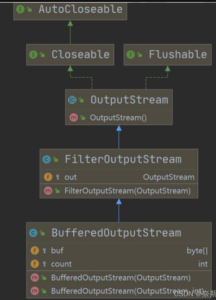
2、BUfferedInputStream是字节流,在创建BufferedInputStream时,会创建一个内部缓冲区数组
5.6拒绝访问原因
1、操作的是一目录而不是文件,
2、只能操作文件!!!!
5.7、ObjectInputStream和ObjectOutputStream流
1、需求
为了保存数据的类型(带格式保存
2、序列化和反序列化
1、序列化就是在保存数据时,保存数据的值和数据类型
2、反序列化就是在恢复数据时,会输数据的值和数据类型
3、必须让某个对象支持序列化机制,则必须让其类是可序列化,为了让某个类是可序列化的,该类必须实现如下两个接口之一
(1)Serializable:标记接口没有声明
(2)Externalizable
(3)以上接口必须定义一个,才能序列化和反序列化)
3、java实现序列化和反序列化
public class ObjectOutStream {
    public static void main(String[] args) throws Exception {
        String filePath = "D:\\robots.txt";
        ObjectOutputStream oos = new ObjectOutputStream(new FileOutputStream(filePath));
        oos.writeInt(100);//可以序列化,自动装想,Integer实现了Serializable接口
        oos.writeBoolean(true);
        oos.writeChar('a');
        oos.writeDouble(9.9);
        oos.writeUTF("大傻瓜");
        oos.writeObject(new Dog("大傻瓜啊",22));
        oos.close();
    }
}
//反序列化
    public static void main(String[] args) throws Exception {
        String filePath = "D:\\robots.txt";
        ObjectInputStream ois = new ObjectInputStream(new FileInputStream(filePath));
//        读取和写入的序列化和反序列化的文件,数据类型需要保持一致
        System.out.println(ois.readInt());
        System.out.println(ois.readBoolean());
        System.out.println(ois.readChar());
        System.out.println(ois.readDouble());
        System.out.println(ois.readUTF());
        Object dog = ois.readObject();
        System.out.println("运行类型="+dog.getClass());
        System.out.println("dog信息="+dog);

//        假设值单独调用Dog方法,需要向下转型
        Dog dog1 =(Dog)dog;
        System.out.println(dog1.getName());
        ois.close();
    }
}
4、注意事项
1、读写顺序要一致
2、要求实现序列化或反序列化对象,需要实现Serializable
3、序列化的类中建议添加SerialVersionUID,为了提高版本的兼容性
4、序列化对象时,默认将里面所有属性都进行序列化,但除了static或transient修改的成员
5、序列化对象时,要求里面属性的类型也需要实现序列化接口
6、序列化具备可继承性,也就是如果某类已经实现了序列化,则它的所有自雷也已经默认实现了序列化(继承。。)
5.8、标准输入和输出
1、System.in编译类型:InputStream
2、System.in运行类型:BufferedInputStream
3、
| 类型 | 默认设备 | |
|---|---|---|
| System.in 标准输入 | InputStream | 键盘 |
| System.out 标准输出 | PrintStream | 显示器 |
5.8、转换流-InputStreamReader和OutputStreamWriter
1、因为各种编码不同导致,内容错误
2、在字节流转换为字符流时,可以使用指定的编码方式
3、主要目的就是为了解决编码错误
1、介绍
1、InputStreamReader:Reader的子类,可以将InputStream(字节流)包装成(字符流)
2、OutputStreamWriter:Writer的子类,实现将OutputStream(字节流)包装成Writer(字符流)
3、纯文本处理,建议将字节流转换为字符流
4、编码格式:utf-8、gbk、gb2312
2、java代码实现
public class CodeQuestion {
    public static void main(String[] args) throws IOException {
        String filePath = "D:\\robots1.txt";
        BufferedReader br = new BufferedReader(new FileReader(filePath));
//          默认读取文件为utf-8
        String s = br.readLine();
        System.out.println("读取到的内容:"+s);
        br.close();
    }
}
//把FileInputStream转换成InputStreamReader

//    解决编码问题
    public static void main(String[] args) throws IOException {
        String filePath="D:\\robots1.txt";
        InputStreamReader isr = new InputStreamReader(new FileInputStream(filePath),"gbk");
//        把InputStreamReader传入BufferedReader
        BufferedReader br  = new BufferedReader(isr);
//        读取
        String s =br.readLine();
        System.out.println("读取内容="+s);
//        关闭流
        br.close();
    }
}
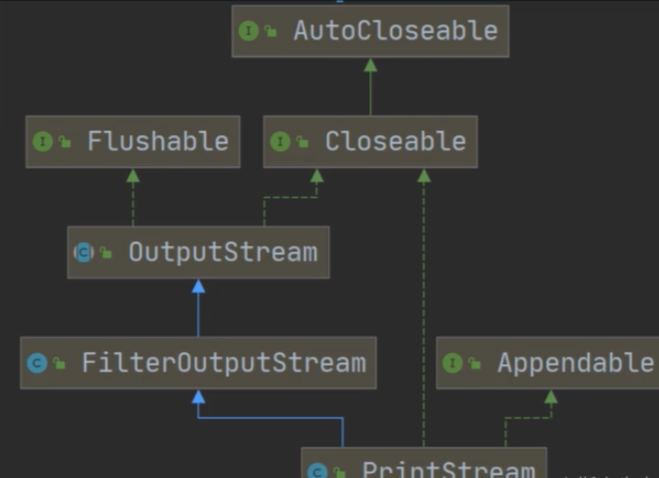
5.9、打印流—PrintStream和PrintWriter
1、PrintStream关系图
2、java例子
public class PrintStream_ {
    public static void main(String[] args) throws IOException {
        PrintStream out = System.out;
//        一下两者本质上是使用一样的底层
        out.write("啊啊啊".getBytes());
        out.print("你好啊 ");

//        改变打印输出的位置
        System.setOut(new PrintStream("D:\\robots1.txt"));
        System.out.println("写入成功");
        out.close();
    }
}
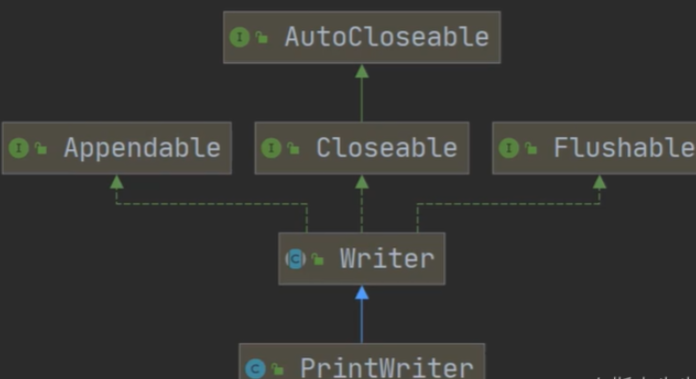
2、PrintWriter关系图
1、java例子
public class PrintWriter_ {
    public static void main(String[] args) throws IOException {
        PrintWriter pw = new PrintWriter(new FileWriter("D:\\robots2.txt"));
        pw.print("大傻瓜");
        pw.close();
    }
}
6、Properties类
6.1、普通书写读取文件
public class Properties01 {
    public static void main(String[] args) throws IOException {
        BufferedReader br = new BufferedReader(new FileReader("src\\mysql.properties"));
        String line = "";
        while ((line  = br.readLine())!=null){
            String [] split = line.split("=");
            System.out.println(split[0]+"值是:"+split[1]);
        }
        br.close();
    }
}
6.2、基本介绍(常用方法)
1、方法
① load:加载配置文件的键值对到Properties对象;
② list:将数据显示到指定设备;
③ getProperty(key):根据键获取值;
④ setProperty(key,value):设置键值对到Properties对象【没有就是新建,有就是修改】;
⑤ store:将Properties中的键值对存储到配置文件中,在IDEA中,保存信息到配置文件,如果含有中文,会存储为unicode码。
2、例子—获取配置文件中信息
public class Properties02 {
    public static void main(String[] args) throws IOException {
//        使用Properties类读取mysql.properties文件
        Properties properties = new Properties();
//        加载指定配置文件
        properties.load(new FileReader("src\\mysql.properties"));
//        把k-v显示控制台
        properties.list(System.out);
//        根据key获取对应值
        String user = properties.getProperty("user");
        String pwd = properties.getProperty("pwd");
        System.out.println("用户名="+user);
        System.out.println("密码"+pwd);
    }
}
3、例子—修改配置文件内容
public class Properties03 {
    public static void main(String[] args) throws IOException {
        Properties properties = new Properties();
//        创建或者修改(存在则认为修改,不存在即创建)
        properties.setProperty("charset","utf-8");
        properties.setProperty("user","大哥");
        properties.setProperty("pwd","abc111");
//        保存
        properties.store(new FileOutputStream("src\\mysql.properties"),"mysql配置");
        System.out.println("配置文件成功");
    }
}
4、例子—家庭作业01
public class homework01 {
    public static void main(String[] args) throws IOException {
        String directorPath = "D:\\mytemp";
        File file  = new File(directorPath);
        if(file.mkdirs()){
            System.out.println("文件已存在");
        }else {
            System.out.println("文件夹创建成功");
        }

        String filePath1 = directorPath+"\\hello.txt";
        File file2  = new File(filePath1);
        if(file2.exists()){
            System.out.println("文件已存在");
        }else{
            file2.createNewFile();
            BufferedWriter bufferedWriter = new BufferedWriter(new FileWriter(file2));
            bufferedWriter.write("hello,你是大傻瓜");
            bufferedWriter.close();
            System.out.println("文件创建成功");
        }
    }
5、例子—家庭作业02
/**
 * 题目:使用BufferedReader读取一个文本文件,为每行加上行号
 */
public class homework02 {
    public static void main(String[] args) throws IOException {
        BufferedReader br = new BufferedReader(new FileReader("D:\\robots.txt"));
        String line ="";
        int lineNum=0;
        while((line=br.readLine())!=null){//循环读取,输出
            System.out.println(++lineNum+line);
        }
        if(br!=null){
            br.close();
        }
    }
}