二、MyBatis基本使用
1、mybatis日志输出配置
1、mybatis-config.xml这个文件里面可以配置一下的文件设计标签和顶层结构
- configuration(配置)
- properties(属性)
- settings(设置)
- typeAliases(类型别名)
- typeHandlers(类型处理器)
- objectFactory(对象工厂)
- plugins(插件)
- environments(环境配置)
- environment(环境变量)
- transactionManager(事务管理器)
- dataSource(数据源)
- databaseIdProvider(数据库厂商标识)
- mappers(映射器)
2、我们这里设置日志。使用setting标签设置
3、如图
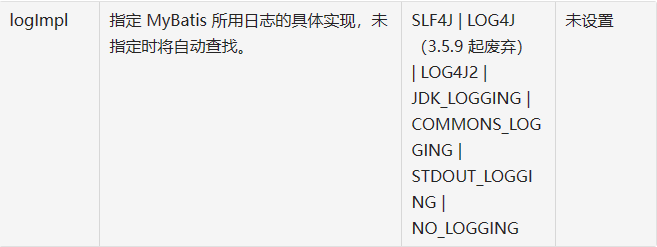
4、实战配置
<?xml version="1.0" encoding="UTF-8" ?>
<!DOCTYPE configuration
        PUBLIC "-//mybatis.org//DTD Config 3.0//EN"
        "http://mybatis.org/dtd/mybatis-3-config.dtd">
<configuration>
<!--    让mybatis开启日志输出-->
    <settings>
<!--        这里设置的是选择用system进行日志输出-->
        <setting name="logImpl" value="STDOUT_LOGGING"/>
    </settings>

    <!-- environments表示配置Mybatis的开发环境,可以配置多个环境,在众多具体环境中,使用default属性指定实际运行时使用的环境。default属性的取值是environment标签的id属性的值。 -->
    <environments default="development">
        <!-- environment表示配置Mybatis的一个具体的环境 -->
        <environment id="development">
            <!-- Mybatis的内置的事务管理器 -->
            <transactionManager type="JDBC"/>
            <!-- 配置数据源 -->
            <dataSource type="POOLED">
                <!-- 建立数据库连接的具体信息 -->
                <property name="driver" value="com.mysql.cj.jdbc.Driver"/>
                <property name="url" value="jdbc:mysql://localhost:3306/mybatis-example"/>
                <property name="username" value="root"/>
                <property name="password" value="root"/>
            </dataSource>
        </environment>
    </environments>

    <mappers>
        <!-- Mapper注册:指定Mybatis映射文件的具体位置 -->
        <!-- mapper标签:配置一个具体的Mapper映射文件 -->
        <!-- resource属性:指定Mapper映射文件的实际存储位置,这里需要使用一个以类路径根目录为基准的相对路径 -->
        <!--    对Maven工程的目录结构来说,resources目录下的内容会直接放入类路径,所以这里我们可以以resources目录为基准 -->
        <mapper resource="mappers/EmployeeMapper.xml"/>
    </mappers>

</configuration>
2、两种形式传参形式
1、${}
1、这个底层是字符串的拼接
1、缺点
1、容易产生sql注入攻击
2、优点
1、一般用来写容器名(表头、列名、标签、sql关键字啥的)
2、#{}
1、底层是使用占位符?
2、优点
1、可以防止sql攻击注入
2、能用#{}就不要去用${}
3、数据输入
1、mybatis总体机制概括
1、如图
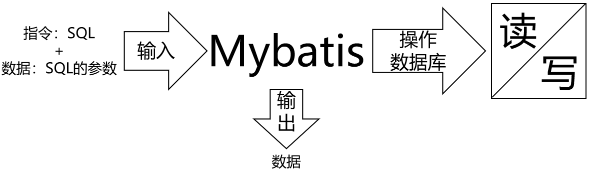
2、概念说明
这里数据输入具体是指上层方法(例如Service方法)调用Mapper接口时,数据传入的形式。
- 简单类型:只包含一个值的数据类型
- 基本数据类型:int、byte、short、double、……
- 基本数据类型的包装类型:Integer、Character、Double、……
- 字符串类型:String
- 复杂类型:包含多个值的数据类型
- 实体类类型:Employee、Department、……
- 集合类型:List、Set、Map、……
- 数组类型:int[]、String[]、……
- 复合类型:List
、实体类中包含集合……
3、单个简单类型参数
1、Mapper抽象方法
int deleteById(Integer id);2、Sql语句
<!--    场景1:单个简单信息传入-->
    <delete id="deleteById">
        delete
        from t_emp
        where emp_id = #{1}
    </delete>
3、单个简单类型参数,在#{}中可以随意命名,但是没有必要。通常还是使用和接口方法参数同名
4、实体类类型参数
1、Mapper抽象方法
//  插入员工信息【实体对象】
    int insertEmp(Employee employee);
2、Sql语句
<!--    场景2:传入的是一个实体对象-->
    <insert id="insertEmp">
        insert into t_emp (emp_name,emp_salary) values(#{empName},#{empSalary})
    </insert>
3、对应关系如图
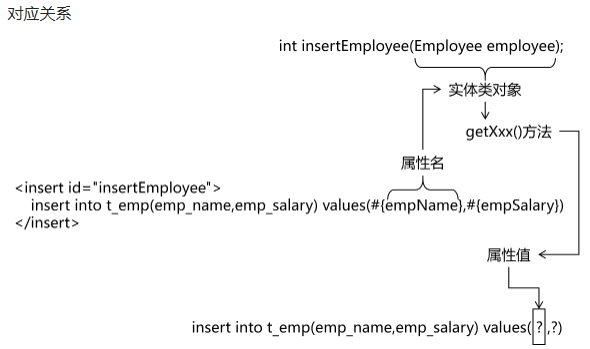
4、结论
- Mybatis会根据#{}中传入的数据,加工成getXxx()方法,通过反射在实体类对象中调用这个方法,从而获取到对应的数据。填充到#{}解析后的问号占位符这个位置。
5、零散的简单类型数据
1、Mapper抽象方法
//    根据员工姓名和工资查询员工信息
//    因为传参顺序不知道,所以我们这里使用@Param指定
    List<Employee> queryByNameAndSalary(@Param("name") String name,@Param("salary") String salary);
//    也可以默认不管,用另外一种mybatis默认的方式
//    List<Employee> queryByNameAndSalary( String name, String salary);
2、Sql语句
<!--    场景3:传入多个简单类型数据如何取值key
            不能随便写
            不能安装形参名称获取
            方法一:注解指定@Param
            方法二:mybatis默认机制
            argo arg1.形成从左到右

-->
<!--    方法1:-->
    <select id="queryByNameAndSalary" resultType="com.atgui.pojo.Employee">
        select emp_id empId,emp_name empName,emp_salary empSalary
        from t_emp
        where emp_salary = #{name} and emp_name = #{salary}
    </select>
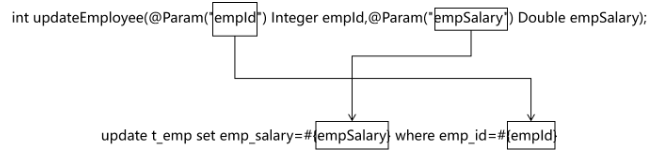
3、零散的多个简单类型参数,如果没有特殊处理,那么Mybatis无法识别自定义名称
4、对应关系图
6、Map类型参数
1、Mapper抽象方法
//    插入员工数据,传入的是一个map(name=员工名字,salary=员工的薪水)
    int insertEmpMap(Map data);
2、Sql语句
    <insert id="insertEmpMap">
        insert into t_emp (emp_name,emp_salary) values(#{empName},#{empSalary})
    </insert>
3、对应关系
-
{}中写Map中的key
4、使用场景
- 有很多零散的参数需要传递,但是没有对应的实体类类型可以使用。使用@Param注解一个一个传入又太麻烦了。所以都封装到Map中。
4、数据输出
1、输出概念
1、数据输出总体上有两种形式:
- 增删改操作返回的受影响行数:直接使用 int 或 long 类型接收即可
- 查询操作的查询结果
2、我们需要做的是,指定查询的输出数据类型即可!
3、并且插入场景下,实现主键数据回显示!
2、单个简单类型
1、重点!!!
<!--    场景1:返回单个简单类型如何指定    resultType的写法,返回值的数据类型
            resultType 语法:
            列的全限定符号
            别名简称
                mybatis中有72中默认别名
                都是java的常用数据类型
                基本数据类型:int doublel -> _int _double
                包装数据类型:Integer Double -> int integer double
                集合容器类型: Map List HashMap -> 小写就行 map list hashmap

                自定义扩展:别名
                        单独定义
                        <typeAliases>
                             <typeAlias type="com.atgui.pojo.Employee" alias="suibian"/>
                        </typeAliases>
                        批量定义
                         <package name="com.atgui.pojo"/>

                         扩展:在批量定义的基础上,单独定义
                         就是先需要批量定义
                         然后用注解@Alias(“xxxx名称”)

-->
2、例子
1、Mapper接口
package com.mapper;

public interface EmployeeMapper {

//    dml语句
    int deleteById(Integer id);

//    指定输出类型,查询语句
//    根据员工的id查询员工的姓名
    String queryNameById(Integer id);

    String querySalaryById(Integer id);
}
2、配置xml文件
<!--    定义自己类的别名-->
    <typeAliases>
<!--        单独定义-->
<!--        <typeAlias type="com.atgui.pojo.Employee" alias="suibian"/>-->
<!--        批量定义-->
        <package name="com.atgui.pojo"/>
    </typeAliases>
3、sql语句
<select id="queryNameById" resultType="java.lang.String"><!-- 这里写的就是全限定符合-->
        select emp_name
        from t_emp
        where emp_id = #{id}
    </select>

    <select id="querySalaryById" resultType="string"> <!-- 这里写的就是别名-->
        select emp_salary
        from t_emp
        where emp_id = #{id}
    </select>
3、补充
下面是Mybatis为常见的 Java 类型内建的类型别名。它们都是不区分大小写的,注意,为了应对原始类型的命名重复,采取了特殊的命名风格。
| 别名 | 映射的类型 |
|---|---|
| _byte | byte |
| _char (since 3.5.10) | char |
| _character (since 3.5.10) | char |
| _long | long |
| _short | short |
| _int | int |
| _integer | int |
| _double | double |
| _float | float |
| _boolean | boolean |
| string | String |
| byte | Byte |
| char (since 3.5.10) | Character |
| character (since 3.5.10) | Character |
| long | Long |
| short | Short |
| int | Integer |
| integer | Integer |
| double | Double |
| float | Float |
| boolean | Boolean |
| date | Date |
| decimal | BigDecimal |
| bigdecimal | BigDecimal |
| biginteger | BigInteger |
| object | Object |
| object[] | Object[] |
| map | Map |
| hashmap | HashMap |
| list | List |
| arraylist | ArrayList |
| collection | Collection |
3、返回实体类对象
1、Mapper接口的抽象方法
Employee selectEmployee(Integer empId);
2、SQL语句
<!-- 编写具体的SQL语句,使用id属性唯一的标记一条SQL语句 -->
<!-- resultType属性:指定封装查询结果的Java实体类的全类名 -->
<select id="selectEmployee" resultType="com.atguigu.mybatis.entity.Employee">

  <!-- Mybatis负责把SQL语句中的#{}部分替换成“?”占位符 -->
  <!-- 给每一个字段设置一个别名,让别名和Java实体类中属性名一致 -->
  select emp_id empId,emp_name empName,emp_salary empSalary from t_emp where emp_id=#{maomi}

</select>
3、select>通过给数据库表字段加别名,让查询结果的每一列都和Java实体类中属性对应起来。
4、增加全局配置自动识别对应关系
5、在 Mybatis 全局配置文件中,做了下面的配置,select语句中可以不给字段设置别名
<!-- 在全局范围内对Mybatis进行配置 -->
<settings>

  <!-- 具体配置 -->
  <!-- 从org.apache.ibatis.session.Configuration类中可以查看能使用的配置项 -->
  <!-- 将mapUnderscoreToCamelCase属性配置为true,表示开启自动映射驼峰式命名规则 -->
  <!-- 规则要求数据库表字段命名方式:单词_单词 -->
  <!-- 规则要求Java实体类属性名命名方式:首字母小写的驼峰式命名 -->
  <setting name="mapUnderscoreToCamelCase" value="true"/>

</settings>
4、返回Map类型
1、适用于SQL查询返回的各个字段综合起来并不和任何一个现有的实体类对应,没法封装到实体类对象中。能够封装成实体类类型的,就不使用Map类型。
2、Mapper接口的抽象方法
Map<String,Object> selectEmpNameAndMaxSalary();3、SQL语句
<!-- Map<String,Object> selectEmpNameAndMaxSalary(); -->
<!-- 返回工资最高的员工的姓名和他的工资 -->
<select id="selectEmpNameAndMaxSalary" resultType="map">
  SELECT
    emp_name 员工姓名,
    emp_salary 员工工资,
    (SELECT AVG(emp_salary) FROM t_emp) 部门平均工资
  FROM t_emp WHERE emp_salary=(
    SELECT MAX(emp_salary) FROM t_emp
  )
</select>
5、返回List集合
1、查询结果返回多个实体类对象,希望把多个实体类对象放在List集合中返回。此时不需要任何特殊处理,在resultType属性中还是设置实体类类型即可。
2、就是说:返回值是集合。resultType不需要指定集合类型。只要指定泛型就行因为和ibatis底层相关,最终还是会调用selectList
3、Mapper接口
//    查询工资高于传入值的员工姓名 200
    List<String> queryNamesBySalary(Double salary);
//    查询全部员工信息
    List<Employee> queryAll();
4、SQL语句
<!--        场景4:返回集合类型是如何指定的
        //    查询工资高于传入值的员工姓名 200
            List<String> queryNamesBySalary(Double salary);
        //    查询全部员工信息
            List<Employee> queryAll();

            切记:返回值是集合。resultType不需要指定集合类型。只要指定泛型就行
            因为和ibatis底层相关,最终还是会调用selectList

-->
    <select id="queryNamesBySalary" resultType="string">
        select emp_name
        from t_emp
        where emp_salary> #{salary}
    </select>

    <select id="queryAll" resultType="employee">
        select *
        from t_emp
    </select>
6、返回主键值
1、自增长类型主键
1、需求:我需要返回自增长类型的主键值
1、Mapper接口
//    员工插入
    int insertEmp(Employee employee);
2、sql语句
<!--    员工插入
            场景5:主键回显。获取插入数据的主键
            useGeneratedKeys :是我们想要数据库字典增长的主键值
            keyColumn : 主键列的值
            keyProperty :接收主键列值的属性!

-->
    <insert id="insertEmp" useGeneratedKeys="true" keyColumn="emp_id" keyProperty="empId">
        insert into t_emp (emp_name,emp_salary) values(#{empName},#{empSalary})
    </insert>
3、测试
@Test
    public void test1() throws IOException {
        InputStream inputStream = Resources.getResourceAsStream("mybatis-config.xml");
        SqlSessionFactory sqlSessionFactory  =new SqlSessionFactoryBuilder().build(inputStream);
        SqlSession sqlSession = sqlSessionFactory.openSession(true);//事务自动提交
        EmployeeMapper mapper = sqlSession.getMapper(EmployeeMapper.class);

        Employee employee = new Employee();
        employee.setEmpName("二狗子");
        employee.setEmpSalary(888.0);

        int row  = mapper.insertEmp(employee);
        System.out.println(employee.getEmpId());

        System.out.println("row = " + row);

        sqlSession.close();
    }
4、主要根据以下3个标签插入到insert语句中
- useGeneratedKeys :是我们想要数据库字典增长的主键值
- keyColumn : 主键列的值
- keyProperty :接收主键列值的属性!
5、注意
- Mybatis是将自增主键的值设置到实体类对象中,而不是以Mapper接口方法返回值的形式返回。
2、非自增长类型主键
1、需求:把字符串类型的主键回显
2、Mapper接口
//    插入老师信息
    int insertTeacher(Teacher teacher);
2、sql语句
<!--
        对于非自增长的主键,我们打算交给mybatis帮我们维护。
        string无法自增长
        所以我们可以指定一段程序,生成一个主键,必须在插入之前
        order = before/after 之前之后
        resultType = 返回值类型
        keyProperty = 查询结果给哪个属性赋值
-->
    <insert id="insertTeacher">

        <selectKey order="BEFORE" resultType="string" keyProperty="tId">
            SELECT REPLACE(UUID(),'-','')
        </selectKey>

        INSERT INTO teacher (t_id,t_name) VALUES(#{tId},#{tName})
    </insert>
3、测试代码
@Test
    public void test2() throws IOException {
        InputStream inputStream = Resources.getResourceAsStream("mybatis-config.xml");
        SqlSessionFactory sqlSessionFactory  =new SqlSessionFactoryBuilder().build(inputStream);
        SqlSession sqlSession = sqlSessionFactory.openSession(true);//事务自动提交
        TeacherMapper teacherMapper = sqlSession.getMapper(TeacherMapper.class);

        Teacher teacher = new Teacher();
        teacher.settName("大傻瓜");

        int i = teacherMapper.insertTeacher(teacher);
        System.out.println("i = " + i);

        sqlSession.close();
    }
4、补充
- 使用这种方式,我们可以方便地插入 UUID 作为字符串类型主键。当然,还有其他插入方式可以使用,如使用Java代码生成UUID并在类中显式设置值等。需要根据具体应用场景和需求选择合适的插入方式。
7、实体类属性名和数据库字段的对应关系
1、别名对应
1、将字段的别名设置成和实体类属性一直
2、就是resultType=写全类名 ,然后SQL语句设置一个别名
3、例子
<!-- 编写具体的SQL语句,使用id属性唯一的标记一条SQL语句 -->
<!-- resultType属性:指定封装查询结果的Java实体类的全类名 -->
<select id="selectEmployee" resultType="com.atguigu.mybatis.entity.Employee">

  <!-- Mybatis负责把SQL语句中的#{}部分替换成“?”占位符 -->
  <!-- 给每一个字段设置一个别名,让别名和Java实体类中属性名一致 -->
  select emp_id empId,emp_name empName,emp_salary empSalary from t_emp where emp_id=#{maomi}

</select>
2、通过全局配置自动识别驼峰命名规则
1、就是属性写驼峰命名,然后数据库的列名写蛇形(xx_xxx)
2、配置如下
<!-- 使用settings对Mybatis全局进行设置 -->
<settings>

  <!-- 将xxx_xxx这样的列名自动映射到xxXxx这样驼峰式命名的属性名 -->
  <setting name="mapUnderscoreToCamelCase" value="true"/>

</settings>
3、sql语句就直接写就好
<!-- Employee selectEmployee(Integer empId); -->
<select id="selectEmployee" resultType="com.atguigu.mybatis.entity.Employee">

  select emp_id,emp_name,emp_salary from t_emp where emp_id=#{empId}

</select>
3、使用resultMap
1、就是自定义映射关系
2、用resultType可以自动映射,但是只能映射一层
3、使用resultMap需要手动设置映射关系,但是可以映射n层。在多表查询中会涉及
4、例子
<resultMap id="tMap" type="teacher">

        <id column="t_id" property="tId"/>
        <result column="t_name" property="tName"/>

    </resultMap>

    <select id="queryById" resultMap="tMap">
        select *
        from teacher
        where t_id = #{tId}
    </select>
4、总结
1、
<!--    场景:解决列名和属性不一致的问题
            方法1:就是使用别名
            方法2:开启驼峰式映射
                    开启驼峰式自动映射
                    <setting name="mapUnderscoreToCamelCase" value="true"/>
            方法3:resultMap自定义映射
                resultType:是可以自动映射,不过只能映射一层
                resultMap:自定义映射,可以映射更深层次,一层或多层

                如何声明:
                id标识:就是对应的select resultMap=”标识“
                type:是指具体的返回值类型 全限定符和别名 | 集合只写泛型即可
                id :主键映射关系
                result:普通列的映射关系
-->
8、单表的CRUD练习
1、代码
1、准备数据库
CREATE TABLE `user` (
  `id` INT(11) NOT NULL AUTO_INCREMENT,
  `username` VARCHAR(50) NOT NULL,
  `password` VARCHAR(50) NOT NULL,
  PRIMARY KEY (`id`)
) ENGINE=INNODB AUTO_INCREMENT=1 DEFAULT CHARSET=utf8;
2、编写实体类
package com.atgui.pojo;

import lombok.Data;

@Data //lombok
public class User {
  private Integer id;
  private String username;
  private String password;
}
3、pom.xml文件
<?xml version="1.0" encoding="UTF-8"?>
<project xmlns="http://maven.apache.org/POM/4.0.0"
         xmlns:xsi="http://www.w3.org/2001/XMLSchema-instance"
         xsi:schemaLocation="http://maven.apache.org/POM/4.0.0 http://maven.apache.org/xsd/maven-4.0.0.xsd">
    <modelVersion>4.0.0</modelVersion>

    <groupId>com.atgui</groupId>
    <artifactId>ssm-mybatis-part</artifactId>
    <version>1.0-SNAPSHOT</version>
    <packaging>pom</packaging>
    <modules>
        <module>mybatis-base-quickly-01</module>
        <module>mybatis-base-param-input-02</module>
        <module>mybatis-base-result-output-03</module>
        <module>mybatis-base-parm-crud-04</module>
    </modules>

    <properties>
        <maven.compiler.source>17</maven.compiler.source>
        <maven.compiler.target>17</maven.compiler.target>
        <project.build.sourceEncoding>UTF-8</project.build.sourceEncoding>
    </properties>
<!--mybatis的依赖-->
    <dependencies>
        <!-- mybatis依赖 -->
        <dependency>
            <groupId>org.mybatis</groupId>
            <artifactId>mybatis</artifactId>
            <version>3.5.11</version>
        </dependency>

        <!-- MySQL驱动 mybatis底层依赖jdbc驱动实现,本次不需要导入连接池,mybatis自带! -->
        <dependency>
            <groupId>mysql</groupId>
            <artifactId>mysql-connector-java</artifactId>
            <version>8.0.25</version>
        </dependency>

        <!--junit5测试-->
        <dependency>
            <groupId>org.junit.jupiter</groupId>
            <artifactId>junit-jupiter-api</artifactId>
            <version>5.3.1</version>
        </dependency>
<!--        lombok插件-->
        <dependency>
            <groupId>org.projectlombok</groupId>
            <artifactId>lombok</artifactId>
            <version>1.18.30</version>
        </dependency>
    </dependencies>

</project>
4、mybatis-config.xml文件
<?xml version="1.0" encoding="UTF-8" ?>
<!DOCTYPE configuration
        PUBLIC "-//mybatis.org//DTD Config 3.0//EN"
        "http://mybatis.org/dtd/mybatis-3-config.dtd">
<configuration>
<!--    让mybatis开启日志输出-->
    <settings>
<!--        这里设置的是选择用system进行日志输出-->
        <setting name="logImpl" value="STDOUT_LOGGING"/>
<!--        开启驼峰式自动映射-->
        <setting name="mapUnderscoreToCamelCase" value="true"/>
    </settings>

<!--    定义自己类的别名-->
    <typeAliases>
<!--        单独定义-->
<!--        <typeAlias type="com.atgui.pojo.Employee" alias="suibian"/>-->
<!--        批量定义-->
        <package name="com.atgui.pojo"/>
    </typeAliases>

    <!-- environments表示配置Mybatis的开发环境,可以配置多个环境,在众多具体环境中,使用default属性指定实际运行时使用的环境。default属性的取值是environment标签的id属性的值。 -->
    <environments default="development">
        <!-- environment表示配置Mybatis的一个具体的环境 -->
        <environment id="development">
            <!-- Mybatis的内置的事务管理器 -->
            <transactionManager type="JDBC"/>
            <!-- 配置数据源 -->
            <dataSource type="POOLED">
                <!-- 建立数据库连接的具体信息 -->
                <property name="driver" value="com.mysql.cj.jdbc.Driver"/>
                <property name="url" value="jdbc:mysql://localhost:3306/mybatis-example"/>
                <property name="username" value="root"/>
                <property name="password" value="root"/>
            </dataSource>
        </environment>
    </environments>

    <mappers>
        <!-- Mapper注册:指定Mybatis映射文件的具体位置 -->
        <!-- mapper标签:配置一个具体的Mapper映射文件 -->
        <!-- resource属性:指定Mapper映射文件的实际存储位置,这里需要使用一个以类路径根目录为基准的相对路径 -->
        <!--    对Maven工程的目录结构来说,resources目录下的内容会直接放入类路径,所以这里我们可以以resources目录为基准 -->
        <mapper resource="mappers/UserMapper.xml"/>
    </mappers>

</configuration>
5、准备接口Mapper
package com.atgui.mapper;

import com.atgui.pojo.User;

import java.util.List;

public interface UserMapper {

    int insert(User user);

    int update(User user);

    int delete(Integer id);

    User selectById(Integer id);

    List<User> selectAll();
}
6、准备接口的配置文件Mappers/Mapper.xml
<?xml version="1.0" encoding="UTF-8" ?>
<!DOCTYPE mapper
        PUBLIC "-//mybatis.org//DTD Mapper 3.0//EN"
        "https://mybatis.org/dtd/mybatis-3-mapper.dtd">
<!-- namespace等于mapper接口类的全限定名,这样实现对应 -->
<mapper namespace="com.atgui.mapper.UserMapper">

    <insert id="insert" useGeneratedKeys="true" keyProperty="id" keyColumn="id">
        insert into user (username,password) value(#{username},#{password});
    </insert>

    <update id="update">
        update user set username =#{username},password = #{password};
    </update>

    <delete id="delete">
        delete
        from user
        where id = #{id};
    </delete>

    <select id="selectById" resultType="user">
        select *
        from user
        where id = #{id};
    </select>

    <select id="selectAll" resultType="user">
        select *
        from user;
    </select>

</mapper>
7、进行测试
package com.atgui;

import com.atgui.mapper.UserMapper;
import com.atgui.pojo.User;
import org.apache.ibatis.io.Resources;
import org.apache.ibatis.session.SqlSession;
import org.apache.ibatis.session.SqlSessionFactory;
import org.apache.ibatis.session.SqlSessionFactoryBuilder;

import org.junit.jupiter.api.AfterEach;
import org.junit.jupiter.api.BeforeEach;
import org.junit.jupiter.api.Test;

import java.io.IOException;
import java.io.InputStream;
import java.util.List;

public class MybatisTest {

    private SqlSession sqlSession;

//    每次测试方法执行前都会执行该代码
    @BeforeEach
    public void before() throws IOException {
        InputStream inputStream = Resources.getResourceAsStream("mybatis-config.xml");
        SqlSessionFactory sqlSessionFactory = new SqlSessionFactoryBuilder().build(inputStream);
        sqlSession = sqlSessionFactory.openSession(true);
    }

    //每次测试方法执行后都会执行该代码
    @AfterEach
    public void clean(){
        sqlSession.close();
    }
    @Test
    public void testInsert(){
        User user = new User();
        user.setUsername("1231");
        user.setPassword("123");
        UserMapper userMapper = sqlSession.getMapper(UserMapper.class);
        userMapper.insert(user);
        System.out.println("userMapper = " + userMapper);
    }

    @Test
    public void testUpdate(){
        UserMapper userMapper = sqlSession.getMapper(UserMapper.class);
        User user = userMapper.selectById(1);//查询到这个再进行修改
        user.setUsername("12311111");
        user.setPassword("12322222");
        userMapper.update(user);

    }

    @Test
    public void testDelete(){

        UserMapper userMapper = sqlSession.getMapper(UserMapper.class);
        userMapper.delete(1);

    }

    @Test
    public void testSelectById(){
        UserMapper userMapper = sqlSession.getMapper(UserMapper.class);
        User user =  userMapper.selectById(1);
        System.out.println("user = " + user);
    }

    @Test
    public void testSelectAll(){
        UserMapper userMapper = sqlSession.getMapper(UserMapper.class);
        List<User> userList = userMapper.selectAll();
        System.out.println("userList = " + userList);
    }

}
9、Mapper.xml总结
1、内容
1、顶级元素
insert– 映射插入语句。update– 映射更新语句。delete– 映射删除语句。select– 映射查询语句。
2、select标签
-
行为细节
-
属性 描述 id在命名空间中唯一的标识符,可以被用来引用这条语句。 resultType期望从这条语句中返回结果的类全限定名或别名。 注意,如果返回的是集合,那应该设置为集合包含的类型,而不是集合本身的类型。 resultType 和 resultMap 之间只能同时使用一个。 resultMap对外部 resultMap 的命名引用。结果映射是 MyBatis 最强大的特性,如果你对其理解透彻,许多复杂的映射问题都能迎刃而解。 resultType 和 resultMap 之间只能同时使用一个。 timeout这个设置是在抛出异常之前,驱动程序等待数据库返回请求结果的秒数。默认值为未设置(unset)(依赖数据库驱动)。 statementType可选 STATEMENT,PREPARED 或 CALLABLE。这会让 MyBatis 分别使用 Statement,PreparedStatement 或 CallableStatement,默认值:PREPARED
3、insert、update、delete标签
-
细节
-
主要insert会使用,因为涉及到主键回显
| 属性 | 描述 |
|---|---|
id |
在命名空间中唯一的标识符,可以被用来引用这条语句。 |
timeout |
这个设置是在抛出异常之前,驱动程序等待数据库返回请求结果的秒数。默认值为未设置(unset)(依赖数据库驱动)。 |
statementType |
可选 STATEMENT,PREPARED 或 CALLABLE。这会让 MyBatis 分别使用 Statement,PreparedStatement 或 CallableStatement,默认值:PREPARED。 |
useGeneratedKeys |
(仅适用于 insert 和 update)这会令 MyBatis 使用 JDBC 的 getGeneratedKeys 方法来取出由数据库内部生成的主键(比如:像 MySQL 和 SQL Server 这样的关系型数据库管理系统的自动递增字段),默认值:false。 |
keyProperty |
(仅适用于 insert 和 update)指定能够唯一识别对象的属性,MyBatis 会使用 getGeneratedKeys 的返回值或 insert 语句的 selectKey 子元素设置它的值,默认值:未设置(unset)。如果生成列不止一个,可以用逗号分隔多个属性名称。 |
keyColumn |
(仅适用于 insert 和 update)设置生成键值在表中的列名,在某些数据库(像 PostgreSQL)中,当主键列不是表中的第一列的时候,是必须设置的。如果生成列不止一个,可以用逗号分隔多个属性名称。 |