十六、JSON、Ajax、i18n
1、JSON
1.1、什么是JSON
1、JSON是一种轻量级的数据交换格式。易于人阅读和编写,也易于机器的解析和生成。
2、JSON完全独立于语言的文本格式,而且很多语言都提供了对json的支持(包括,c,c++,C#,Java,JavaScript,Perl,Python等)
3、理想的数据交换格式
4、轻量级是指跟xml比较
5、数据交换是客户端和服务器之间业务数据的传递格式。
1.2、JSON的访问
1、JSON本身是一个对象
2、json中的key我们可以理解为是对象中的一个属性
3、json中的key访问就和我们属性一样:json对象.key
        <script type="text/javascript">
            // json的定义
            var jsonObj = {
                "key1":12,
                "key2":"abc",
                "key3":true,
                "key4":[11,"arr",false],
                "key5":{
                    "key5_1":551,
                    "key5_2":"key_2_value",

                },
                "key6":[{
                    "key6_1_1":6661,
                    "key6_2_2":"keykey",
                },{

                }]
            }
            // json的访问

            alert(typeof (jsonObj));

            alert(jsonObj.key1);
            alert(jsonObj.key4);//得到数组[11,"arr",false]

            alert(jsonObj.key5.key5_1);//551
            // for(var i=0;i<jsonObj.key4.length;i++){   数组遍历
            //  alert(jsonObj.key4[i]);
            // }

            //取出每一个元素都是json对象
            var jsonItem = jsonItem.key6[0];
            alert(jsonItem.key6_1_1);//6661

            // json对象转字符串
            var jsonObjString = JSON.stringify(jsonObj);
            alert(jsonObjString);
            // json字符串转json对象
            var jsonObj2 = JSON.parse(jsonObjString);
            alert(jsonObj2);
        </script>
1.3、json的两个常用方法
1、json的存在有两种形式
1、一种是:对象的形式存在,叫接送对象
2、另一种是:字符串的形式,我们叫它json字符串
3、一般我们操作json中的数据的时候,需要json对象的格式。
4、一般我们在客户端和服务器进行数据交换的时候,使用的是json字符串
5、JSON.stringify():把json对象转化为json字符串
6、JSON.parse():把json字符串转换成为json对象
2、例子
<script type="text/javascript">
    // json对象转字符串
        var jsonObjString = JSON.stringify(jsonObj);
        alert(jsonObjString);
        // json字符串转json对象
        var jsonObj2 = JSON.parse(jsonObjString);
        alert(jsonObj2);
</script>
1.4、JSON在java中的使用
1、javaBean和json的互转
//    javaBean和json的互转
    @Test
    public void test1(){
        Person person = new Person(1,"涛哥好帅");
//      创建gson对象实例
        Gson gson  = new Gson();
//        tojson可以把java对象转化成json字符串
        String personJsonString = gson.toJson(person);
        System.out.println(personJsonString);
//        fromJson把json字符串转换回java对象
        /*
            第一个参数是json对象字符串
            第二个参数是json转回去的对象类型
         */
        Person person1 = gson.fromJson(personJsonString,Person.class);
        System.out.println(person1);
    }
2、List和json互转
//    list和json的互转
    @Test
    public void test2(){
        List<Person> personList = new ArrayList<>();
        personList.add(new Person(1,"涛哥"));
        personList.add(new Person(1,"涛哥哥"));

        //      创建gson对象实例
        Gson gson  = new Gson();

        String personListJsonString =   gson.toJson(personList);
        System.out.println(personListJsonString);

        List list = gson.fromJson(personListJsonString,new PersonListType().getType());
        System.out.println(list);

    }
3、map和json的互转
    @Test
    public void test3(){
        Map<Integer, Person> personMap = new HashMap<>();
        personMap.put(1,new Person(1,"涛哥很帅"));
        personMap.put(2,new Person(2,"涛哥非常帅"));

        Gson gson  = new Gson();
        String personMapJsonString = gson.toJson(personMap);
        System.out.println(personMapJsonString);

//        需要创建PersonListType的具体继承类,有点麻烦,所以直接改为匿名内部类
//        Map<Integer, Person> personMap2 =gson.fromJson(personMapJsonString,new PersonListType().getType());
        Map<Integer, Person> personMap2 =gson.fromJson(personMapJsonString,new TypeToken<Map<Integer, Person>>(){}.getType());
        System.out.println(personMap2);

        Person p = personMap2.get(1);
        System.out.println(p);

    }
2、AJAX请求
2.1、什么是AJAX请求
1、内容
1、AJAX 即“Asynchronous Javascript AndXML”(异步 JavaScript 和 XML),是指一种创建交互式网页应用的网页开发技术。
2、AJAX是一种浏览器通过js异步发起请求,局部更新页面的技术。
3、ajax请求的局部更新,浏览器地址栏不会发生变化
4、局部更新不会舍弃原来页面的内容
2.2、原生ajax请求的示例
<!DOCTYPE html PUBLIC "-//W3C//DTD HTML 4.01 Transitional//EN" "http://www.w3.org/TR/html4/loose.dtd">
<html>
   <head>
      <meta http-equiv="pragma" content="no-cache" />
      <meta http-equiv="cache-control" content="no-cache" />
      <meta http-equiv="Expires" content="0" />
      <meta http-equiv="Content-Type" content="text/html; charset=UTF-8">
      <title>Insert title here</title>
      <script type="text/javascript">
<!--         使用JavaScript语言发起ajax请求,-->
         function ajaxRequest() {
//              1、我们首先要创建XMLHttpRequest
            var  xmlhttpRequest = new XMLHttpRequest();
//              2、调用open方法设置请求参数
            xmlhttpRequest.open("GET","http://localhost:8077/_json_ajax_i18n/ajaxServlet?action=javaScriptAjax",true);

//              4、在send方法前绑定onreadystatechange事件,处理请求完成后的操作。
            xmlhttpRequest.onreadystatechange =function (){
               if(xmlhttpRequest.readyState==4 && xmlhttpRequest.status==200){
                  var jsonObj = JSON.parse(xmlhttpRequest.responseText);

               // 把响应的数据显示在页面上
                  document.getElementById("div01").innerHTML = "编号:"+jsonObj.id+"名称:"+jsonObj.name;
               }
            }

//              3、调用send方法发送请求
               xmlhttpRequest.send();

         }
      </script>
   </head>
   <body>
      <button onclick="ajaxRequest()">ajax request</button>
      <div id="div01">
      </div>
   </body>
</html>
2.3、JQuery中的AJAX请求
1、$.ajax方法内容
1、内容
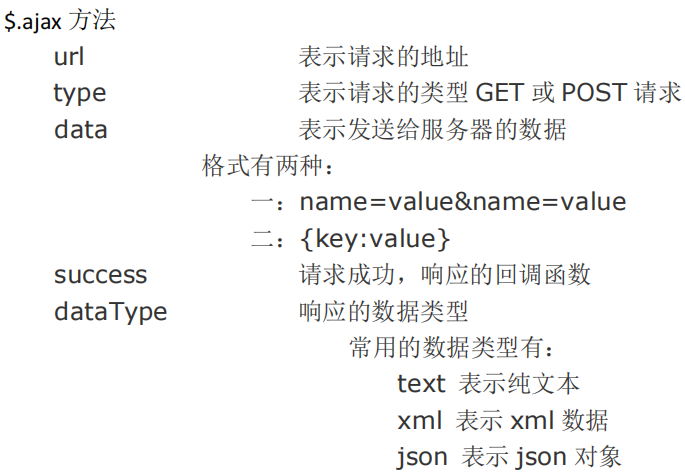
2、代码例子
// ajax请求
$("#ajaxBtn").click(function(){
   $.ajax({
      url:"http://localhost:8077/_json_ajax_i18n/ajaxServlet",
      // data:"action=JQueryAjax",
      data:{action:JQueryAjax},
      type:"GET",
      success:function (data){
         alert("服务器返回的数据是:"+data);
         var jsonObj = JSON.parse(data);
         $("#msg").html("编号:"+jsonObj.id+"姓名:"+jsonObj.name);
      },
      // dataType:"text"
   });

});
2、$.get 方法和$.post 方法内容
1、内容
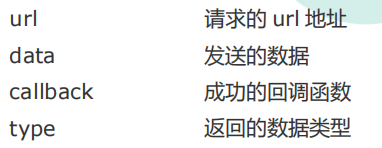
2、例子
// ajax--get请求
    $("#getBtn").click(function(){
    $.get("http://localhost:8077/_json_ajax_i18n/ajaxServlet","action=JQueryGet",function (data) {
                        $("#msg").html("get编号:"+data.id+"姓名:"+data.name);
                    },"json");
    });

// ajax--post请求
    $("#postBtn").click(function(){
        // post请求
        $.post("http://localhost:8077/_json_ajax_i18n/ajaxServlet","action=JQueryPost",function (data) {
                        $("#msg").html("post编号:"+data.id+"姓名:"+data.name);
                    },"json");

    });
3、$.getJSON 方法内容
1、内容
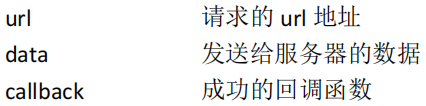
2、例子
// ajax--getJson请求
$("#getJSONBtn").click(function(){
   // 调用
   $.getJSON("http://localhost:8077/_json_ajax_i18n/ajaxServlet","action=JQueryGetJson",function (data) {
      $("#msg").html("JQueryGetJson编号:"+data.id+"姓名:"+data.name);
   },"json");

});
4、表单序列化 serialize()
1、serialize()可以把表单中所有表单项的内容都获取到,并以 name=value&name=value 的形式进行拼接。
2、例子
// ajax请求
$("#submit").click(function(){

   $("#form01").serialize();
   // 把参数序列化
   // 调用
   $.getJSON("http://localhost:8077/_json_ajax_i18n/ajaxServlet","action=JQuerySerialize&"+$("#form01").serialize(),function (data) {
      $("#msg").html("JQueryGetJson编号:"+data.id+"姓名:"+data.name);
   },"json");
});
3、i18n
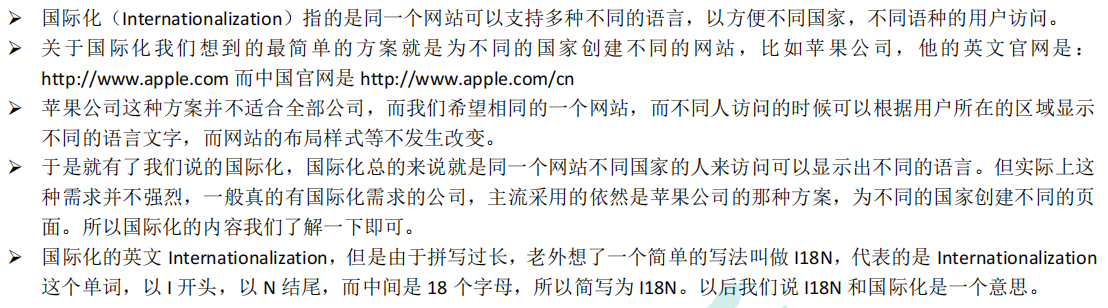
3.1、什么是i18n国际化
1、内容
3.2、国际化相关要素介绍
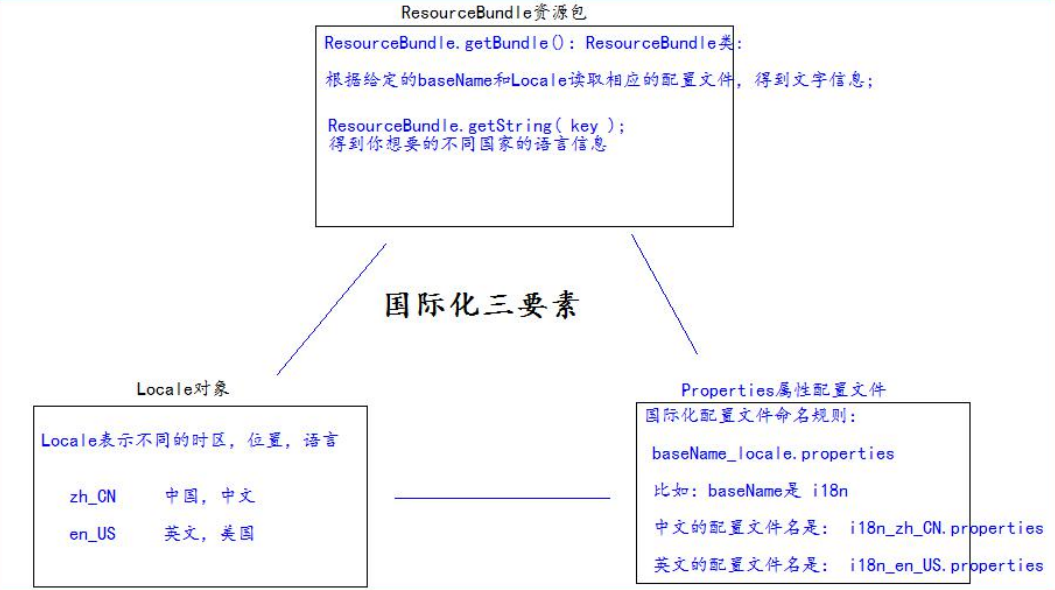
3.3、国际化资源properties测试
1、配置两个语言的配置文件
1、i18n_en_US.properties 英文
username=username
password=password
sex=sex
age=age
regist=regist
boy=boy
girl=girl
email=email
reset=reset
submit=submit
2、i18n_zh_CN.properties 英文
username=名称
password=密码
sex=性别
age=年龄
regist=注册
boy=男
girl=女
email=邮箱
reset=重置
submit=提交
2、国际化测试代码
package com.qt.i18n;

import org.junit.Test;

import java.util.Locale;
import java.util.ResourceBundle;

public class I18nTest {
//    /获取系统默认的语言,国家信息
    @Test
    public void testLocale(){
        Locale locale = Locale.getDefault();
        System.out.println(locale);

        for (Locale avaiLableLocale:Locale.getAvailableLocales()){
            System.out.println(avaiLableLocale);
        }

//      获取中文,中国的常量的locale对象
        System.out.println(Locale.CHINA);
//        获取英文
        System.out.println(Locale.US);
    }
@Test
    public void testI18n(){
//        得到的Locale对象
        Locale locale = Locale.CHINA;
//        通过指定的localeBase和Locale对象,读取响应的配置文件。
        ResourceBundle resourceBundle= ResourceBundle.getBundle("i18n",locale);

        System.out.println("username:"+resourceBundle.getString("username"));
        System.out.println("password:"+resourceBundle.getString("password"));
        System.out.println("sex:"+resourceBundle.getString("sex"));

    }
}
3.4、通过请求头国际化页面
1、代码
    <a href="i18n.jsp?country=cn">中文</a>|
    <a href="i18n.jsp?country=usa">english</a>
    <center>
        <h1><%=i18n.getString("regist")%></h1>
        <table>
        <form>
            <tr>
                <td><%=i18n.getString("username")%></td>
                <td><input name="username" type="text" /></td>
            </tr>
            <tr>
                <td><%=i18n.getString("password")%></td>
                <td><input type="password" /></td>
            </tr>
            <tr>
                <td><%=i18n.getString("sex")%></td>
                <td><input type="radio" /><%=i18n.getString("boy")%><input type="radio" /><%=i18n.getString("girl")%></td>
            </tr>
            <tr>
                <td><%=i18n.getString("email")%></td>
                <td><input type="text" /></td>
            </tr>
            <tr>
                <td colspan="2" align="center">
                <input type="reset" value="<%=i18n.getString("reset")%>" />
                <input type="submit" value="<%=i18n.getString("submit")%>" /></td>
            </tr>
            </form>
        </table>
        <br /> <br /> <br /> <br />
    </center>
    国际化测试:
    <br /> 1、访问页面,通过浏览器设置,请求头信息确定国际化语言。
    <br /> 2、通过左上角,手动切换语言
3.5、通过显示的选择语言类型进行国际化
    <%
//  //从请求头获取Locale信息
        Locale locale = null;
//      System.out.println(locale);
////        获取读取包(根据指定的baseName和Locale读取语言信息)

//      解决用户手动修改语言按钮

        String country = request.getParameter("country");
        if("cn".equals(country)) {
            locale = Locale.CHINA;
        }else if("usa".equals(country)){
            locale = Locale.US;
        }else {
            locale = request.getLocale();
        }

        ResourceBundle i18n = ResourceBundle.getBundle("i18n",locale);

    %>
3.6、JSTL标签库实现国际化
1、内容
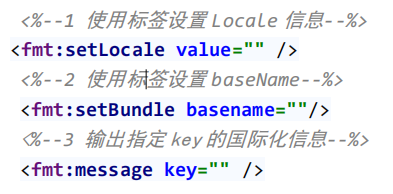
2、例子
<%@ page language="java" contentType="text/html; charset=UTF-8"
   pageEncoding="UTF-8"%>
<%@ taglib prefix="fmt" uri="http://java.sun.com/jsp/jstl/fmt"%>
<!DOCTYPE html PUBLIC "-//W3C//DTD HTML 4.01 Transitional//EN" "http://www.w3.org/TR/html4/loose.dtd">
<html>
<head>
<meta http-equiv="pragma" content="no-cache" />
<meta http-equiv="cache-control" content="no-cache" />
<meta http-equiv="Expires" content="0" />
<meta http-equiv="Content-Type" content="text/html; charset=UTF-8">
<title>Insert title here</title>
</head>
<body>

<%--
   使用标签设置Locale信息
   使用标签设置baseName
   使用标签输出国际化信息
--%>

<%--设置locale语言信息--%>
   <fmt:setLocale value="${param.locale}"/>
<%--使用标签设置baseName--%>

   <fmt:setBundle basename="i18n"/>
   <a href="i18n_fmt.jsp?locale=zh_CN">中文</a>|
   <a href="i18n_fmt.jsp?locale=en_US">english</a>
   <center>
      <h1><fmt:message key="regist"/></h1>
      <table>
      <form>
         <tr>
            <td><fmt:message key="username"/></td>
            <td><input name="username" type="text" /></td>
         </tr>
         <tr>
            <td><fmt:message key="password"/></td>
            <td><input type="password" /></td>
         </tr>
         <tr>
            <td><fmt:message key="sex"/></td>
            <td><input type="radio" /><fmt:message key="boy"/>
               <input type="radio" /><fmt:message key="girl"/></td>
         </tr>
         <tr>
            <td><fmt:message key="email"/></td>
            <td><input type="text" /></td>
         </tr>
         <tr>
            <td colspan="2" align="center">
            <input type="reset" value="<fmt:message key="reset"/>" />
            <input type="submit" value="<fmt:message key="submit"/>" /></td>
         </tr>
         </form>
      </table>
      <br /> <br /> <br /> <br />
   </center>
</body>
</html>